


The advantages of WordPress are many, but the disadvantages must also be considered.
If we want to create a website but don't know how or with what, here is an article that will clear up your doubts.
What is WordPress
To get straight to the point, it is a CMS or content management system that is very easy to use and you would be surprised to know how many websites have been built with its technology. We are talking about more than 40% of all websites having been created in WordPress.
This has likely been driven by the large number of advantages it offers. But not everything is perfect — its use also has disadvantages. I will cover both in the following sections.
What are the advantages and disadvantages of WordPress
Here is a brief summary for a quick overview — further below each topic is explored in depth:
Advantages of WordPress
- It is open source and free
- It has free support
- Building and maintaining a website on WordPress is very affordable
- It has a very intuitive interface
- It is learned quickly
- No programming knowledge required
- It is very easy to install
- Hosting servers are adapted to WordPress
- Natively responsive (Gutenberg and Page Builders)
- Regular updates
- Thousands of extensions available
- A large number of "ready-made" templates
- Easy to optimise for SEO
- Native membership system
- You can create an online store in little time
- Great customisation capacity
- Good loading speed and performance
- Native language for coding
- Many professionals specialising in WordPress
Disadvantages of WordPress
- Security
- Many low-performance sites due to unprofessional management
- Scalability for very large websites
A deeper look at the advantages of WordPress
It is open source and free
WordPress is free. Yes, like the wind. We can go to wordpress.org and download the latest version without anyone asking us why, how, or when.
Free support
To be clear, we don't have a customer service agent on the phone 24/7. But there is such a large global community that we can search any question on Google and almost certainly find the answer. If not, we can always post our question in one of the WordPress forums or Stack Overflow and someone will reply without asking for anything in return.
It is very affordable
WordPress itself is completely free. However, the cost of a WordPress website can vary depending on its features and complexity. I recommend checking out our article where we explain this topic in detail.
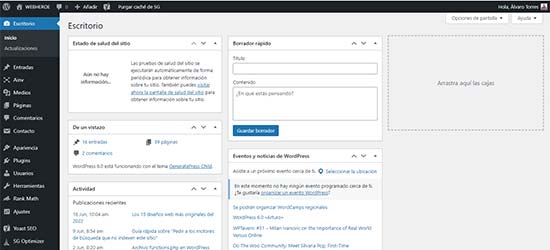
It has a very intuitive interface
The WordPress control panel is one of the easiest and most intuitive available. I believe anyone could spend a couple of hours exploring it and already start building a website.
It has a very fast and simple learning curve
This is closely linked to the previous point. One of WordPress's strong points — and why it has become so popular — is how quickly it can be learned. There is an endless number of online tutorials that will guide you through the first steps with WordPress. For example, a Google search for "WordPress beginner tutorial" will reveal the vast amount of free quality content available.
No need to know HTML, CSS, etc.
That's right, the heading says it all. We can use WordPress's native visual editor, Gutenberg, or a visual page builder like Elementor. In a couple of hours and without prior knowledge you can have a reasonably decent website. Of course, skills need refining over time.
It is very easy to install
WordPress is extremely straightforward to install. If you want to use a local server for testing purposes, you can use Xampp, for example. Simply download and install Xampp, then extract the latest version of WordPress into a folder at c:/xampp/htdocs.
Almost all (if not all) hosting providers are fully adapted to WordPress
Today, thanks to the enormous expansion of WordPress, almost all servers are adapted to WordPress. In fact, the vast majority of hosting providers allow you to install a new WordPress website with a single click — and you're up and running! Remarkably simple.
It is natively adapted to all devices
Indeed. Gutenberg or any of the available visual page builders allows us to design a website that will then automatically adapt to each device. Although, since it is an automated process, the result won't be as precise as on a custom-coded website.
It has regular updates
Both WordPress itself and its themes, templates, and plugins are created by external sources that constantly improve their code and features. Keeping the website properly updated significantly reduces the chances of experiencing any issues.
It has a large number of extensions (plugins)
Plugins are the extensions we can install in WordPress with a single click. There is a great variety of free and paid plugins for every taste and need. Installing plugins can be a double-edged sword, as I explain further below.
WordPress has a large number of templates
WordPress themes are essentially pre-built websites that can be installed with a single click. You can then modify images, text, and features to your liking. As with plugins, I explain below how this can be a double-edged sword.

It is easy to optimise for SEO
WordPress already includes specific fields for On-Page SEO optimisation, such as the alt attribute for images. For more dedicated optimisation, you can use more comprehensive plugins like Yoast.
It has a built-in membership system
WordPress allows the creation of different users with different roles. This enables multiple people to work on the website, each with different capabilities depending on their tasks. And all of this can be done with just a couple of clicks!
Easy creation of online stores
If you want to sell a product or service on your website, you can install one of the WordPress extensions. Among them, you can find WooCommerce, one of the most widely used online store frameworks in the world.
It has great customisation flexibility
WordPress is 100% customisable. We can create any design and functionality we can think of. That said, code-level optimisation and customisation is best left to more advanced users.
Great loading speed and performance
With the right knowledge, WordPress performance can be optimised to an incredible degree. However, using visual page builders may cost you points in this area.
It has a native language
This is for advanced users only. WordPress is built in PHP, but it has a very simple and intuitive native language. In fact, some say that WordPress is a PHP framework.
Easy access to WordPress specialists
The fact that this technology is the most widely used for building websites means that far more specialists are available and that prices are more competitive. That said, never lose sight of the difference between paying for a custom-coded development versus a website built with page builders.
Something very important to bear in mind is that the ease of use of WordPress has also led to many companies offering web services with an apparently respectable result, but with terrible performance. This is why we must learn how to hire a web designer and not focus exclusively on appearance.
A deeper look at the disadvantages of WordPress
As with everything in life, not everything is advantageous. But honestly, the only disadvantages I have been able to find in using WordPress stem from the misuse that inexperienced users tend to make of it.

Security
The fact that so many free or easily accessible templates and extensions (plugins) are available means anyone can read their source code, since it is public. This has its advantages, of course, but a person with technical knowledge and malicious intent can create a security vulnerability, although this clearly happens rarely.
As a precaution, I always recommend a 100% custom-coded WordPress website to minimise third-party code. For example, one thing we can do through code is add a reCAPTCHA in WordPress to the login and registration forms.
Ease and speed of creating designs and features
The fact that designing a website and creating its features (plugins, templates, and page builders) is so easy with WordPress means that anyone can quickly build a website without any knowledge of development, design, or code.
This is undeniably an advantage. But without the right knowledge, it is easy to fall into an excess of plugins, visual page builders, and templates. This causes many problems, including:
- Incompatibilities
- Security vulnerabilities
- Slow website loading
- Poor user experience
- Inability to achieve good Google rankings due to insufficient website quality
As with the previous point, the best solution is to build the most customised website possible. And, of course, have it built by expert WordPress developers.
Scalability
WordPress makes a large number of database queries to load any page on your website. This has many advantages, but when dealing with a website containing thousands of products, thousands of pages, and thousands of multimedia files such as videos and images, the queries can slow down.
This has a performance impact, although there are also tricks to improve loading times through, for example, indexing certain tables.
It should be noted that this only occurs on truly massive websites.
While WordPress has many advantages, it is also important to consider its limitations. One of them is performance, which can be affected by excessive plugin use. To improve this, you can use, for example, WordPress transients, which allow data to be stored in cache temporarily, thus reducing database queries.
For example, the WordPress wp_options table stores important site data such as the URL, path, and configuration. It also contains plugin and theme settings, along with transients.
What disadvantages does WordPress have for SEO campaigns
As already mentioned, WordPress has a large number of plugins that make it easy to implement any functionality we want.
But in SEO, we need our website to be as well optimised as possible. The vast majority of plugins have a performance impact that can directly affect rankings. So if we want our website to be 100% optimised, we will need professionals who can work on our site's code. Below is a list of the disadvantages we may encounter for an SEO campaign:
- We need professional developers to optimise our website's performance
- Use of plugins that affect performance
- Sections of the website that, in order to edit them, would require doing so through code
That said, a WordPress website can be perfectly configured for any SEO campaign with the right plugins designed for this purpose. The only issue we would encounter is performance.
Comparison between WordPress advantages and disadvantages
| Advantage | Disadvantage | |
| Open source and free | X | |
| Free support | X | |
| Very affordable to build and maintain a website | X | |
| Very intuitive interface | X | |
| Fast learning curve | X | |
| No advanced web development knowledge required | X | |
| Easy to install | X | |
| Adapted servers | X | |
| Natively responsive | X | |
| Regular updates | X | |
| Thousands of extensions available | X | |
| Large number of templates | X | |
| Easy to optimise for SEO | X | |
| Native membership system | X | |
| Create an online store quickly | X | |
| Customisation capacity | X | |
| Loading speed and performance | X | |
| Native programming language | X | |
| Many specialised professionals | X | |
| Security | X | |
| Low-performance sites due to unprofessional management | X | |
| Scalability for very large websites | X |
Conclusion on the advantages and disadvantages of WordPress
It is clear that WordPress is one of the best options when it comes to building a website, especially if you lack development knowledge, since the WordPress control panel makes it easy to modify, add, and remove parts of the website, and even add new features without needing to pay a developer for every little thing.
That said, if we want to maintain easy management alongside clean code and optimal performance, we will have no choice but to pay a professional developer to build the website — after which we can manage it ourselves without any issues. WebHeroe has gone a step further and specialised in developing WordPress websites that harness the best of clean code while maintaining the simple interface so that anyone can manage their website.



Comments
Be the first to comment on this post.